
SmartThings
Samsung Electronics Co., Ltd.Lifestyle
4.671.54K Reviews
- Version
- Varies With Device
- Installs
- 1.00B
- Age Rating
- Everyone
Screenshots
Our Review of SmartThings
 Analysis by Appyee
I like SmartThings best when I think of it as a shared control panel, not a magic fix for every smart-home problem. It can bring supported devices and Samsung appliances into one place, which is useful when I want fewer separate apps to check. The trade-off is that a connected home still depends on compatible equipment and a reliable network; the app can make everyday control simpler, but it cannot make every device behave identically.
Why one control point can matter
Smart-home apps often work well within their own brand but become awkward when a home gradually fills with products from different makers. I find the appeal here is having a single place to check and operate compatible devices rather than remembering which manufacturer’s app controls each one. That convenience is practical, not just cosmetic: it can make a quick adjustment easier when you are already doing something else.
SmartThings is a free lifestyle app from Samsung Electronics Co., Ltd. It has an average rating of 4.6 from around 4.9 million ratings, and more than a billion installs. Those figures suggest broad interest, but they do not guarantee that a particular mix of devices will work smoothly. I would treat the app as a possible hub for a specific home, then check whether the devices I already own are supported before building a setup around it.
The age rating is Everyone, and the app has been available since April 17, 2017. That long presence gives it a familiar role in Samsung’s connected-device ecosystem, though the day-to-day value still comes down to the products in your home and how you want to use them.
Where the routines earn their keep
A routine is more useful when it removes a small repeated decision than when it tries to automate everything. I would start with one predictable moment, such as a bedtime sequence that switches off selected lights or a leaving-home routine that changes a few devices together. Keeping the first routine simple makes it easier to see which step is useful and to troubleshoot if something does not happen as expected.
That measured approach also helps avoid a common smart-home frustration: an automation that sounds clever but becomes inconvenient in real life. A morning routine, for example, should account for the fact that people do not always wake at the same time. I would choose actions that are easy to override manually and avoid making a routine depend on a long chain of devices before I know how dependable each one is.
Notifications can also be useful when they answer a clear question, such as whether a device needs attention while I am away. I would keep alerts focused rather than enabling every possible notice. Too many low-value alerts are easy to ignore, which defeats the point of receiving the important ones.
Getting a mixed setup under control
Before connecting a roomful of equipment, I would add devices one at a time and give each a clear room or name. That little bit of housekeeping pays off later: a label such as “hall lamp” is easier to act on than a generic device name when you are trying to make a quick change. It also makes a growing dashboard less confusing for anyone else in the household.
SmartThings can be a sensible alternative to juggling each compatible manufacturer’s app, but it is not automatically a replacement for them in every situation. A device maker’s own app may offer more detailed controls for its product, while SmartThings is more compelling when the goal is to bring several supported devices together. I would keep a manufacturer app available if it is needed for setup or a control that the shared interface does not expose.
Compatibility deserves a little care before purchase. Seeing a familiar brand name is not enough reason to assume that every product from that brand will offer the same controls. I would check the exact model and the functions I care about, then think about whether I need simple on-and-off access, status checks, or a more involved automation. The right answer may differ from one device to another.
What can make the experience frustrating
A smart-home app is only as responsive as the path between the phone, the home network, and the device. If a command arrives late, I would first separate a connection problem from an app problem: check whether the device itself is reachable, then try the command again before rebuilding a routine. That is a more useful first step than assuming a delay means the whole setup has failed.
There is also a difference between basic use and careful setup. Adding a device may be straightforward, while deciding how rooms, routines, and alerts should work takes thought. I would not recommend starting with a complicated automation if the household is new to connected devices. A few dependable controls are better than an elaborate setup no one else knows how to use.
Who should choose it
I would consider SmartThings if I already use Samsung appliances or have a mix of supported smart-home products and want a central place to manage them. It may also suit a household where several people need understandable room-based controls. The best fit is someone willing to check compatibility and spend a little time organizing devices, rather than someone expecting every product to connect with no setup decisions.
On the other hand, if I only own one smart device and its maker’s app already does everything I need, adding another control layer may not improve much. The same goes for someone who wants a highly specialized feature offered only in a device’s own app. In those cases, sticking with the simpler option is reasonable.
My take after living with the idea
Hey there! So, I’ve been diving into the world of smart home technology recently, and today I’m sharing my thoughts on a pretty cool app: SmartThings. If you're like me and love having everything connected and controlled at your fingertips, this app might just be your new best friend.
Getting Started with SmartThings
First things first, setting up SmartThings is a breeze. You can download it from the App Store or Google Play, and it’s free, which is a nice bonus. Once you’ve got it installed, the app guides you through the setup process with ease. I was pleasantly surprised by how intuitive it was to connect my devices. Whether you’re linking up a smart bulb or a thermostat, the app walks you through each step.
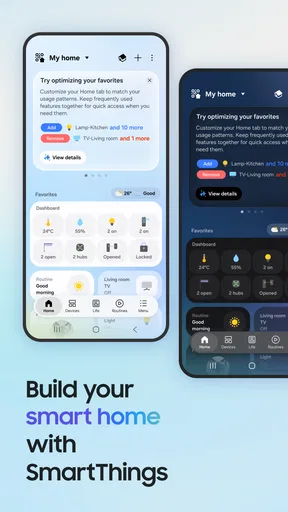
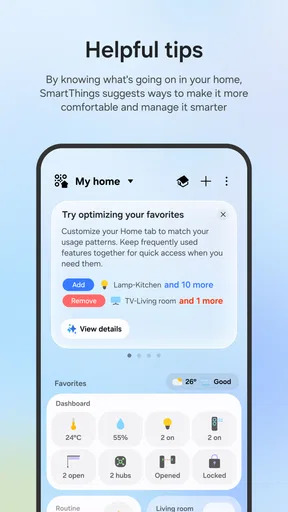
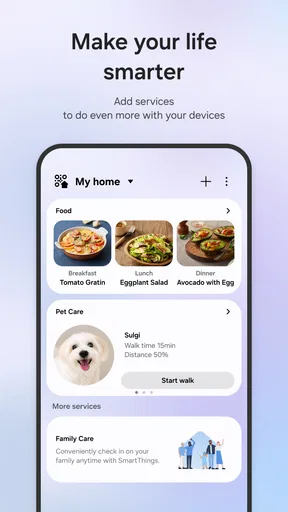
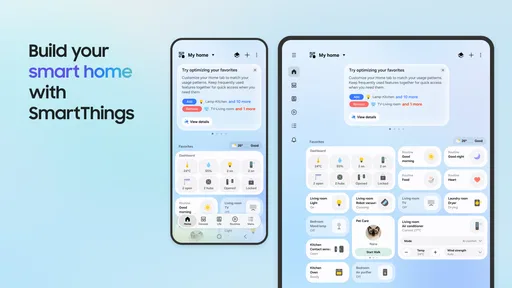
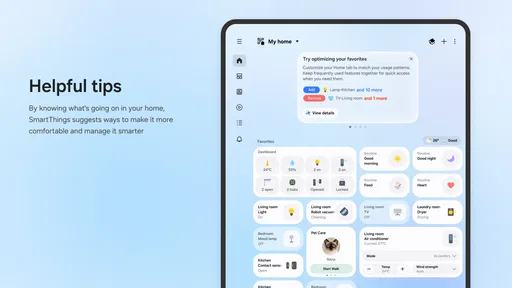
One thing I really appreciated was the app’s clean interface. It’s not cluttered, making it super easy to find what you’re looking for. The dashboard gives you a quick overview of all your connected devices, and you can arrange them however you like. You can even create different rooms, so if you’re a bit of a neat freak like me, you’re going to love this feature.
Features that Make Life Easier
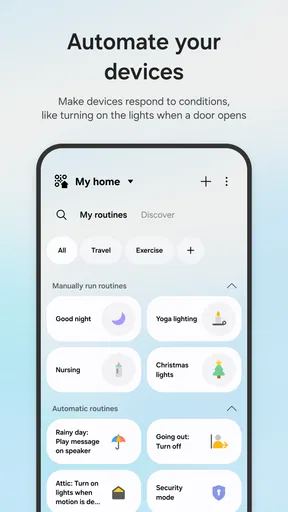
One of the standout features of SmartThings is its automation capabilities. You can set up routines that automate your daily tasks. For example, I have a "Good Morning" routine that turns on my lights, adjusts the thermostat, and even starts the coffee maker. It’s like having a personal assistant who never complains about early mornings!
Another feature I found super handy is the ability to receive alerts. The app notifies you if there’s unusual activity at home, which is perfect for keeping an eye on things when you’re away. It gives you peace of mind knowing your home is under constant watch.
Compatibility and Connectivity
Here’s where SmartThings truly shines. The app is compatible with a wide variety of smart devices, from different brands. Whether you’ve got Samsung appliances, Philips Hue lights, or Google Nest devices, SmartThings has you covered. It’s like the United Nations of smart home tech, bringing everything together under one roof.
The app supports multiple protocols like Zigbee, Z-Wave, and even Wi-Fi, so connectivity is never an issue. I’ve personally connected a range of devices without a hitch, and they all play nicely together.
A Few Things to Consider
While the app is fantastic, it’s not without its quirks. Occasionally, I noticed a slight lag when controlling devices, especially if my internet connection wasn’t at its best. It’s not a dealbreaker, but something to keep in mind if you’re expecting instant responses every time.
Also, while the app is generally user-friendly, some of the more advanced features require a bit of a learning curve. If you’re new to smart home tech, you might find yourself poking around a bit before you get everything just right. But hey, part of the fun is tinkering, right?
Final Thoughts
All in all, SmartThings is a stellar app for anyone looking to simplify their smart home setup. With its robust features, wide compatibility, and user-friendly design, it’s definitely worth checking out. Whether you’re a tech newbie or a seasoned smart home enthusiast, this app has something to offer.
So, if you’re ready to take control of your home with just a few taps, give SmartThings a whirl. It’s like having your home in the palm of your hand, and honestly, who wouldn’t want that?
Privacy and Permissions
See what permissions an app requests and how it handles your data.
- Identity
- find accounts on the device, read your own contact card
- Contacts
- find accounts on the device, read your contacts
- Location
- approximate location (network-based), precise location (GPS and network-based)
- Phone
- directly call phone numbers, modify phone state, read phone status and identity
- Photos/Media/Files
- read the contents of your USB storage, modify or delete the contents of your USB storage
- Storage
- read the contents of your USB storage, modify or delete the contents of your USB storage
- Camera
- take pictures and videos
- Microphone
- record audio
- Wi-Fi connection information
- view Wi-Fi connections
- Device ID & call information
- read phone status and identity
- Other
- view network connections, pair with Bluetooth devices, access Bluetooth settings, change network connectivity, allow Wi-Fi Multicast reception, connect and disconnect from Wi-Fi, expand/collapse status bar, full network access, change your audio settings, run at startup, limit number of running processes, draw over other apps, control vibration, prevent device from sleeping, modify system settings, install shortcuts
How SmartThings Compares
Full ComparisonChoose Google Home for Nest and Chromecast control, SmartThings for Samsung households and broad device support, or Alexa for voice control and a large skills library.
| App | Developer | Rating | Price |
|---|---|---|---|
 Google Home | Google LLC | 4.0 | Free |
 SmartThingsThis App | Samsung Electronics Co., Ltd. | 4.6 | Free |
 Amazon Alexa | Amazon Mobile LLC | 4.1 | Free |
Verdict
Strengths of SmartThings
- Seamless integration with Samsung devices.
- User-friendly interface for easy navigation.
- Wide range of compatible smart devices.
- Automated routines for convenience.
- Remote control from anywhere.
Limitations of SmartThings
- Limited compatibility with non-Samsung devices.
- Occasional connectivity issues.
- Requires constant internet access.
- Some features need a Samsung account.
- App updates can be slow.
Other Releases by Samsung Electronics Co., Ltd.
View All
Samsung Calendar
Productivity4.1

Samsung Browser
Communication3.6

Samsung Music
Music & Audio3.8

Samsung Email
Productivity4.4
Similar Picks in This Category
View All
Google Home
Google LLC4.0

Pinterest4.2

Astrotalk - Talk to Astrologer
Astrology & Horoscope4.7

My Verizon
Verizon Consumer Group4.5

Samsung Wallet (Samsung Pay)
Samsung Electronics Co., Ltd.4.1

Super Slime Simulator: DIY Art
Dramaton4.5
You May Also Like
View All
Frequently Asked Questions
What is SmartThings and how does it work?
SmartThings is a comprehensive home automation platform that allows users to connect, control, and monitor various smart devices from a single app. It supports a wide range of devices, including lights, cameras, thermostats, and more. The app provides real-time notifications and can automate routines based on user preferences, making home management seamless and efficient.
Which devices are compatible with SmartThings?
SmartThings supports a vast array of smart devices from popular brands like Samsung, Philips Hue, Ring, and Nest, among others. The app is compatible with smart lights, locks, cameras, thermostats, and more. It's important to check specific device compatibility on the SmartThings website to ensure seamless integration and functionality.
Is SmartThings secure to use?
Yes, SmartThings prioritizes user security and privacy. The app uses advanced encryption protocols to protect user data and prevent unauthorized access. Regular updates and security patches are also provided to enhance security measures. Users are encouraged to follow best practices, like using strong passwords and enabling two-factor authentication, to further secure their smart home environment.
How easy is it to set up SmartThings?
Setting up SmartThings is straightforward and user-friendly. The app guides users through the process of connecting devices step-by-step. Users can easily add devices, set up rooms, and customize routines with clear instructions. The intuitive interface ensures that even those new to smart home technology can quickly get their system up and running.
Are there any costs associated with using SmartThings?
The SmartThings app itself is free to download and use. However, costs may arise from purchasing compatible smart devices and any optional subscriptions for additional services or features. Some advanced functionalities, like professional monitoring, might incur extra fees. It's advisable to review any potential costs before integrating additional devices or services.
